Envoy External Authorization with OPA

Microservices improve productivity of individual development teams by breaking down applications into smaller, standalone parts. However, microservices alone do not solve age-old distributed systems problems like service discovery, authentication, and authorization. In fact, these problems are often more acute due to the heterogenous and ephemeral nature of microservice environments.
As more organizations adopt microservice architectures, the need for decoupled authentication and authorization has become apparent. This post dives into how you can leverage Envoy, SPIFFE/SPIRE, and the Open Policy Agent (OPA) to enforce important security policies in microservice environments.
Background
Envoy is a L7 proxy and communication bus designed for large modern service oriented architectures. Envoy (v1.7.0+) supports an External Authorization filter which calls an authorization service to check if the incoming request is authorized or not. This feature makes it possible to delegate authorization decisions to an external service and also makes the request context available to the service. The request context contains information such as the source of a network activity, destination of a network activity, the network request (eg. http request). All this information can be used by the external service to make an informed decision about the fate of the incoming request received by Envoy.
SPIFFE, the Secure Production Identity Framework for Everyone, is a set of open-source standards for securely identifying software systems in dynamic and heterogeneous environments. Systems that adopt SPIFFE can easily and reliably mutually authenticate wherever they are running. SPIRE (the SPIFFE Runtime Environment) is a toolchain for establishing trust between workloads across a wide variety of platforms.
The Open Policy Agent (OPA) is an open source, general-purpose policy engine that enables unified, context-aware policy enforcement across the entire stack. OPA's high-level declarative language Rego allows authoring of fine-grained security policies and is purpose built for reasoning about information represented in structured documents.
OPA as an External Authorization Service
We will walkthrough an example of using Envoy's External authorization filter with OPA as an authorization service.
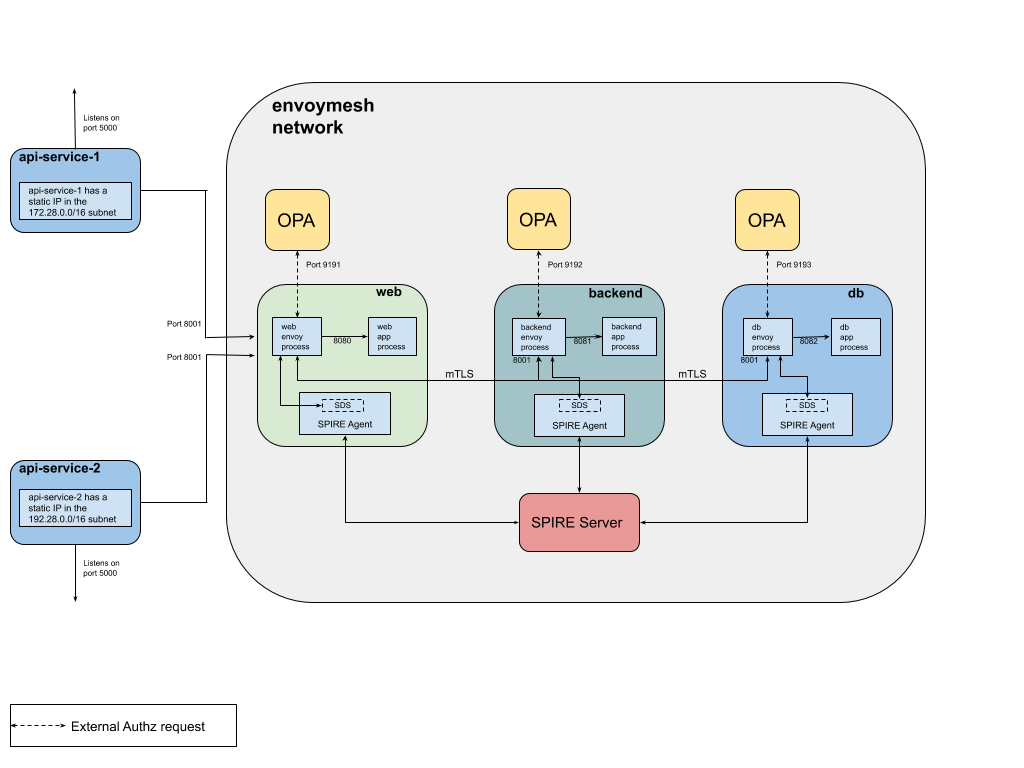
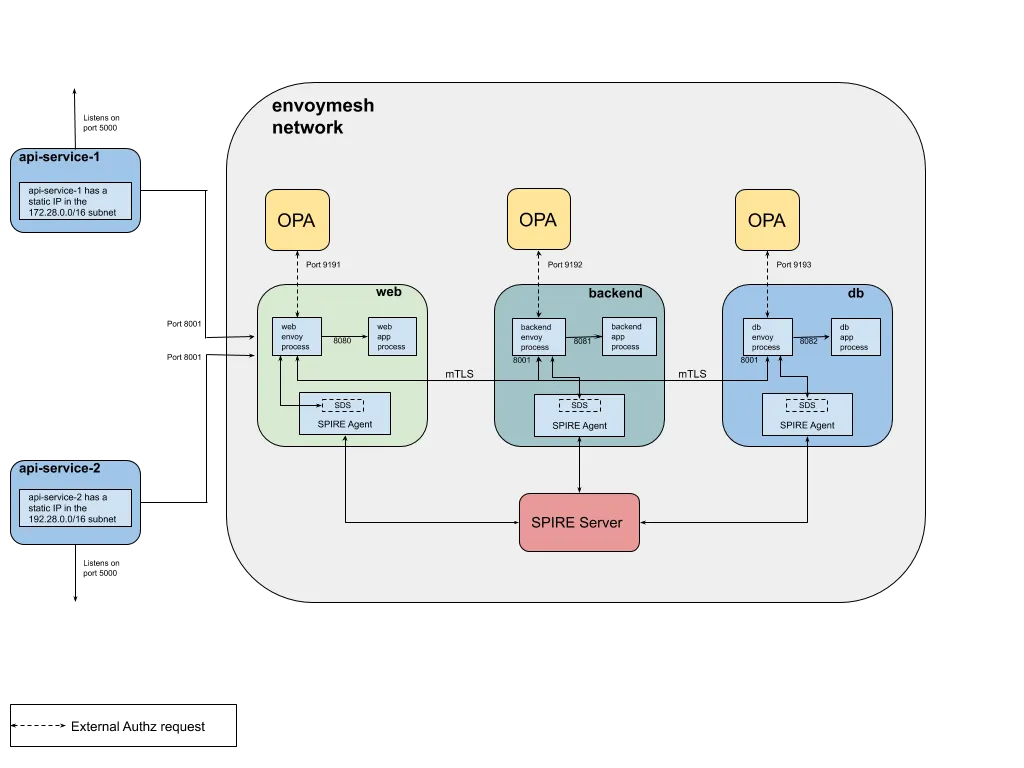
The example consists of three services (web, backend and db) colocated with a running service Envoy. Each service uses the external authorization filter to call its respective OPA instance for checking if an incoming request is allowed or not.
The web service receives all inbound requests from api-server-1 and api-server-2 which are deployed in different subnets. The request is forwarded to the backend service which then calls the db service.
Secure communication between the web, backend and db service is established by configuring the Envoy proxies in each container to establish a mTLS connection with each other. Envoy retrieves client and server TLS certificates and trusted CA roots for mTLS communication from a SPIRE Agent which implements an Envoy SDS. The agent in-turn fetches this information from the SPIRE Server and makes it available to an identified workload. In the following example, SPIRE provides each workload an identity, in the form of a SPIFFE ID embedded in the TLS certificate, to facilitate mTLS communication. The SPIFFE ID of each workload can then be used by OPA to build the authorization policy. More information on SPIRE can be found here.
- Envoy is listening for ingress on port 8001 in each container.
- api-server-1 and api-server-2 are flask apps running on port 5000 and 5001 respectively and forward requests to the web service.
- api-server-1 has a static IP in the 172.28.0.0/16 subnet while api-server-2 has one in the 192.28.0.0/16 subnet.
- OPA is extended with a GRPC server that implements the Envoy External authorization API.
- data.envoy.authz.allow is the default OPA policy that decides whether a request is allowed or not.
- Both the GRPC server port and default OPA policy that is queried are configurable.
Running the Example
Step 1: Install Docker
Ensure that you have recent versions of docker and docker-compose installed.
Step 2: Clone the repo and Start containers
Clone the OPA-Envoy-SPIRE repo with git clone git@github.com:ashutosh-narkar/opa-envoy-spire-ext-authz.git
cd opa-envoy-spire-ext-authz
docker-compose up --build -d
docker-compose ps
The following containers should be running:
                  Name                                 Command               State                 Ports
----------------------------------------------------------------------------------------------------------------------
opa-envoy-spiffe-ext-authz_api-server-1_1   flask run --host=0.0.0.0         Up      0.0.0.0:5000->5000/tcp
opa-envoy-spiffe-ext-authz_api-server-2_1   flask run --host=0.0.0.0         Up      0.0.0.0:5001->5000/tcp, 5001/tcp
opa-envoy-spiffe-ext-authz_backend_1        /bin/sh -c /usr/local/bin/ ...   Up      10000/tcp
opa-envoy-spiffe-ext-authz_db_1             /bin/sh -c /usr/local/bin/ ...   Up      10000/tcp
opa-envoy-spiffe-ext-authz_opa_be_1         ./opa_istio_linux_amd64 -- ...   Up      0.0.0.0:9192->9192/tcp
opa-envoy-spiffe-ext-authz_opa_db_1         ./opa_istio_linux_amd64 -- ...   Up      0.0.0.0:9193->9193/tcp
opa-envoy-spiffe-ext-authz_opa_web_1        ./opa_istio_linux_amd64 -- ...   Up      0.0.0.0:9191->9191/tcp
opa-envoy-spiffe-ext-authz_spire-server_1   /usr/bin/dumb-init /opt/sp ...   Up
opa-envoy-spiffe-ext-authz_web_1            /bin/sh -c /usr/local/bin/ ...   Up      10000/tcp, 0.0.0.0:8001->8001/tcp
Step 3: Start SPIRE Infrastructure
Start the SPIRE Agents and register the web, backend and db servers with the SPIRE Server. More information on the registration process can be found in the SPIRE workload registration guide.
./configure-spire.sh
Step 4: Exercise Ingress Policy
The Ingress Policy states that the web service can ONLY be accessed from the subnet 172.28.0.0/16.
Check that api-server-1 can access the web service.
$ curl -i localhost:5000/hello
HTTP/1.0 200 OK
Content-Type: text/html; charset=utf-8
Content-Length: 29
Server: Werkzeug/0.15.2 Python/2.7.15
Date: Thu, 02 May 2019 21:21:48 GMT

Hello from the web service !
Check that api-server-2 cannot access the web service.
$ curl -i localhost:5001/hello
HTTP/1.0 403 FORBIDDEN
Content-Type: text/html; charset=utf-8
Content-Length: 40
Server: Werkzeug/0.15.2 Python/2.7.15
Date: Thu, 02 May 2019 21:22:12 GMT

Access to the Web service is forbidden.
Step 5: Exercise Service-To-Service Policy
The Service-To-Service Policy policy states that a request can flow from the web to backend to db service.
Check that this flow is honored.
$ curl -i localhost:5000/the/good/path
HTTP/1.0 200 OK
Content-Type: text/html; charset=utf-8
Content-Length: 35
Server: Werkzeug/0.15.2 Python/2.7.15
Date: Thu, 02 May 2019 21:22:50 GMT

Allowed path: WEB -> BACKEND -> DB
Check that the web service is NOT allowed to directly call the db service.
$ curl -i localhost:5000/the/bad/path
HTTP/1.0 403 FORBIDDEN
Content-Type: text/html; charset=utf-8
Content-Length: 26
Server: Werkzeug/0.15.2 Python/2.7.15
Date: Thu, 02 May 2019 21:23:22 GMT

Forbidden path: WEB -> DB
Example OPA Policy
Each service calls its respective OPA instance for a decision and loads its desired policies into OPA. To see the OPA policies loaded by a service checkout the docker directory in the repo.
Example Policy — 1
The following OPA policy used in the example above is loaded into the OPA called by the web service.
web service can ONLY be accessed from the subnet 172.28.0.0/16
import input.attributes.request.http as http_request
import input.attributes.source.address as source_address

default allow = false

allowed_paths = {"/hello", "/the/good/path", "/the/bad/path"}

# allow access to the Web service from the subnet 172.28.0.0/16 for the allowed paths
allow {
    allowed_paths[http_request.path]
    http_request.method == "GET"
    net.cidr_contains("172.28.0.0/16", source_address.Address.SocketAddress.address)
}
Try the OPA-Envoy Ingress policy in the Rego Playground!
Example Policy — 2
Another policy used in the example states that:
a request can flow from the web to backend to db service
Below is a policy snippet that is loaded into the OPA called by the db service. This policy allows requests to the db service from ONLY the backend service.
package envoy.authz

import input.attributes.request.http as http_request
import input.attributes.source.address as source_address

default allow = false

# allow Backend service to access DB service
allow {
    http_request.path == "/good/db"
    http_request.method == "GET"
    svc_spiffe_id == "spiffe://domain.test/backend-server"
}

svc_spiffe_id = client_id {
    [_, _, uri_type_san] := split(http_request.headers["x-forwarded-client-cert"], ";")
    [_, client_id] := split(uri_type_san, "=")
}
Try the OPA-Envoy Service-Service policy in the Rego Playground!
X-Forwarded-Client-Cert header is injected by the Envoy proxy of the originating service and validated by the Envoy proxy of the destination service. Envoy is configured to forward the URI field in the client certificate. To identify the service making the request, this policy uses the URI field of the X-Forwarded-Client-Cert header which in this case is the SPIFFE ID of the backend server.
x-forwarded-client-cert (XFCC) is a proxy header which indicates certificate information of part or all of the clients or proxies that a request has flowed through, on its way from the client to the server. More information about the header and it's supported keys can be found in the Envoy HTTP headers documentation.
Example Envoy configuration
Here's an example configuration for an Envoy proxy that listens for HTTP client connections on port 80 and then calls OPA's gRPC server that implements the Envoy External Authorization API.
static_resources:
  listeners:
  - address:
      socket_address:
        address: 0.0.0.0
        port_value: 80
    use_original_dst: true
    filter_chains:
    - filters:
      - name: envoy.http_connection_manager
        typed_config:
          "@type": type.googleapis.com/envoy.config.filter.network.http_connection_manager.v2.HttpConnectionManager
          codec_type: auto
          stat_prefix: ingress_http
          access_log:
            - name: envoy.file_access_log
              config:
                path: "/dev/stdout"
          route_config:
            name: local_route
            virtual_hosts:
            - name: backend
              domains:
              - "*"
              routes:
              - match:
                  prefix: "/hello"
                route:
                  cluster: web-service
              - match:
                  prefix: "/the/good/path"
                route:
                  cluster: web-service
              - match:
                  prefix: "/the/bad/path"
                route:
                  cluster: web-service
          http_filters:
          - name: envoy.ext_authz
            config:
              failure_mode_allow: false
              grpc_service:
                google_grpc:
                  target_uri: opa:9191
                  stat_prefix: ext_authz
                timeout: 0.5s
          - name: envoy.router
            config: {}
  clusters:
  - name: web-service
    connect_timeout: 0.25s
    type: strict_dns
    lb_policy: round_robin
    http2_protocol_options: {}
    load_assignment:
      cluster_name: web-service
      endpoints:
      - lb_endpoints:
        - endpoint:
            address:
              socket_address:
                address: web-service
                port_value: 80
admin:
  access_log_path: "/dev/null"
  address:
    socket_address:
      address: 0.0.0.0
      port_value: 8001
And that's it
And that's how you use OPA as an External authorization service to enforce ingress and service-to-service security policies using Envoy's External authorization filter. OPA leverages the authentication framework provided by SPIFFE/SPIRE and by configuring Envoy to forward client certificate details, OPA is able to make authorization decisions based on the SPIFFE ID included in the URI SAN of the client X.509 certificate.
Source Code
The code for the example can be found at https://github.com/open-policy-agent/opa-envoy-spire-ext-authz.