This is the second part of a blog series on the design principles behind Open Policy Agent's (OPA's) policy language Rego. Previously we described how Rego's syntax was designed to mirror the structure of real-world policies. In this part of the series, we look at why and how Rego exclusively uses hierarchical data (e.g. JSON and YAML) to represent the raw information it uses to make decisions and to represent the decisions themselves. In the next part of the series, we discuss why and how OPA aims to optimize the performance of policy evaluation automatically.
Quick OPA Refresher
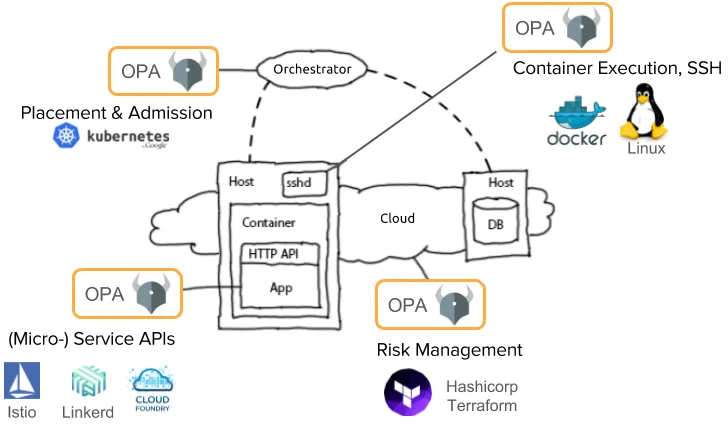
OPA is designed to offload policy decisions from a broad range of software services. You typically run OPA on the same server as the software needing policy decisions and cajole that software into asking OPA for a policy decision whenever it needs to. As shown in the diagram below, OPA makes a decision using the following pieces of information:
- Policy query. An arbitrary JSON document provided by the service needing a policy decision. Think of the policy query as the concrete information (e.g. user-action-resource) that OPA needs to make a decision about.
- External data. Any number of JSON documents injected into OPA out-of-band of the policy query that represent what's happening in the real world (e.g. the current resources in a k8s cluster or resource attributes like owner, size, etc.) and that are kept up to date as the world changes.
- Rego policy. One or more Rego policies. Rego is a custom language purpose-built for expressing policy across any domain.
The focus of this blog post is to explain why and how we chose to use JSON to represent the policy query, the external data, and even the policy decision itself.
JSON is Everywhere
JSON (or more generally hierarchically structured data) is pervasive throughout the cloud-native ecosystem. Public clouds, kubernetes clusters, No-SQL (and even SQL) databases, service meshes, microservice APIs, and application configuration all ingest and export their state in JSON. Hierarchical data (as opposed to say relational data stored in classic SQL databases) is here to stay, arguably because it is well-suited for modeling many different aspects of software applications and the infrastructure they run on. And further, the prevalence of HTTP/JSON APIs makes JSON a pervasive format for exchanging information.
What this means for OPA is that it's a near certainty that when a service is asking OPA for a policy decision, it will have some hierarchical data that OPA needs to make the decision.
For example, maybe it's a JSON Web Token (JWT) that represents the user and her attributes:
{
  "sub": "1234567890",
  "name": "Alice Smithsonian",
  "iat": 1516239022,
  "groups": ["employee", "billing-manager"]
}
Or, maybe it's information about the attributes for a pet at a pet store:
{
  "id": "i0779921",
  "name": "Lassie",
  "breed": "collie",
  "owners": [{
    "first": "Rudd",
    "last": "Weatherwax"
  }]
}
It could also be a description of the configuration for an application running on Kubernetes (here shown in the usual k8s YAML that converts easily to JSON):
apiVersion: admission.k8s.io/v1beta1
kind: AdmissionReview
request:
  kind:
    group: extensions
    kind: Ingress
    version: v1beta1
  object:
    metadata:
      name: prod
      labels:
        costcenter: retail
    spec:
      rules:
      - host: initech.com
        http:
          paths:
          - path: /finance
            backend:
              serviceName: banking
              servicePort: 443
          - path: /retail
            backend:
              serviceName: storefront
              servicePort: 8080
All across the stack, from infrastructure to microservices to the business data stored by an application, JSON is pervasive for representing information. Moreover, even in those areas where JSON data is not pervasive like SQL databases, it is straightforward to convert flat, non-hierarchical data into JSON; whereas, converting JSON into a non-hierarchical data format while possible presents many usability challenges.
How OPA interacts with the outside world
Remember that OPA can consume two sources of data to make policy decisions:
- the data that the service provides as the policy query
- the external data that gets injected into OPA that represents the state of the outside world
Both of those are arbitrary JSON. OPA does NOT impose any kind of schema or data model on those JSON documents. All OPA knows is that it's a chunk of JSON; it is up to the policy author to understand what that JSON represents in the world and write the policy that makes the appropriate decision.
We could have designed OPA differently. We could have designed OPA to have a schema or data model for each domain (e.g. k8s, service mesh, databases, applications) and required the outside world to adapt its data to OPA's model.
For example, suppose OPA required every policy query to have three fields:
- username: a string that represents the user taking an action
- action: a string that names the action of the user is trying to take
- resource: a string identifying the resource being acted upon
This would mean that every application asking OPA for an authorization decision would need to supply exactly those three fields. If the application had the user information stored in the JWT as shown below, it could not just hand that JWT to OPA — it would need to extract the sub (subject) value and include it as the username value.
{
  "sub": "1234567890",
  "name": "Alice Smithsonian",
  "iat": 1516239022,
  "groups": ["employee", "billing-manager"]
}
Imposing a schema or data model would have made building OPA easier because it shifts the burden for integration to the outside world. Every system in the world that wants to integrate with OPA would need to include OPA-specific code that transforms the data to meet OPA's requirements.
Moreover, the same is true for the external data that OPA uses to make decisions. If OPA imposed a data model on all external data, the system pushing that data into OPA would need to understand OPA's data-model and transform the data from the outside world to match that model.
Instead, OPA was designed to ingest arbitrary JSON data for both the policy query and external data. This makes integrating with OPA easy: just convert the information into JSON (which every programming language has standard libraries for) and send it across. No need to ETL your data to get it into OPA — any webhook will suffice to integrate OPA. In short…
OPA should adapt to data in the outside world, not the other way around
Ingesting JSON data in whatever form is natural for the outside world is easy, but it does mean that the policy language Rego needs to be flexible enough that people can write policies that adapt to that format. The policy language can't rely on a fixed location for the username or the action, for example. It must be expressive enough that people can write policy that bridges the gap between the world's data model and the format that is best for expressing policy.
Rego support for JSON
The starting point for a Rego policy is (i) an arbitrary JSON object representing the policy query (a.k.a. input) provided by the external software (e.g. an API call, a configuration file, a data element, etc.) and (ii) some number of arbitrary JSON objects representing the state of the world. Neither OPA nor Rego understand what that data means in the real world, but the policy author does. The policy author writes Rego to encode the logic that navigates through those JSON documents and compares them to hard-coded values or other bits of JSON in order to make a decision.
For example, for a simple HTTP API the input JSON object could be:
{
  "method": "GET",
  "path": "/dogs/dog123",
  "user": "alice",
  "roles": ["customer", "guest"]
}
As a policy author, I know that this JSON object represents an HTTP API, but Rego doesn't. If I want to allow all GET requests to the root path, I write a simple rule with conditions on the input document (a global variable in Rego representing the policy query provided to OPA):
allow {
    input.method == "GET"
    input.path == "/"
}
This example shows simple equality checks with strings, but in general you might need to break a path like /dogs/dog123 into multiple pieces, manipulate numbers, inspect the internals of a JWT, etc. The scalar values in JSON often contain information that needs to be extracted or manipulated.
Rego must manipulate JSON scalar types: booleans, numbers, strings, and null
To that end, Rego has 50+ built in functions documented at openpolicyagent.org that provide all kinds of basic functionality needed to inspect and construct the scalar JSON types.
Of course, the whole point of supporting JSON is not the scalar types — it's the composite types: arrays and objects. Without those, there's no hierarchy at all.
There are two key requirements that arise from supporting JSON arrays and objects: the ability to drill down through a hierarchy (which you've already seen via dot notation) and the ability to iterate over elements of a collection (elements of an array or key/value pairs of an object).
Rego must navigate through deeply-nested arrays and objects
Navigating through arrays and objects when you know the exact path is straightforward in Rego. It uses same syntax used by many programming languages: dot-notation and bracket notation.
For example, suppose the following JSON object is the input.
{
  "id": "i0779921",
  "name": "Lassie",
  "breed": "collie",
  "owners": [{
    "first": "Rudd",
    "last": "Weatherwax"
  }]
}
You can write all of the following expressions to navigate through this JSON document.
input.name
input["name"]
input.owners[0]
input.owners[0].first
More interesting is iteration. 99% of Rego statements are simple if statements, and iteration is primarily used as a condition in one of those if statements.
For example, say you want to allow an admin to perform any operation, and you're given an input that lists all the user's roles.
{
  "method": "GET",
  "path": "/dogs/dog123",
  "user": "alice",
  "roles": ["customer", "guest"]
}
You need to write a policy that says the request should be allowed if there is some element of the roles array that equals "admin".
Iteration in Rego uses the keyword some. You write an expression testing whether a condition is true and apply some to the variables in that expression that you want to iterate over.
In the admin example, you write the following Rego to check if there is some index i of the roles array where input.roles[i] equals "admin".
allow {
    some i
    input.roles[i] == "admin"
}
You can apply some to many variables at once. For Kubernetes policies this happens all the time. Here is an object that is roughly what Kubernetes hands over for admission control — notice how deeply nested the data is.
kind:
  kind: Ingress
  group: extensions
metadata:
  name: prod
  labels:
    costcenter: retail
spec:
  rules:
  - host: initech.com
    http:
      paths:
      - path: /finance
        backend:
          serviceName: banking
          servicePort: 443
      - path: /retail
        backend:
          serviceName: storefront
          servicePort: 8080
If you want to deny the creation of this resource whenever there is some servicePort that is not 443, you would write the following Rego.
deny {
    input.kind.kind == "Ingress"
    some i,j
    input.spec.rules[i].http.paths[j].backend.servicePort != 443
}
While that path to servicePort is somewhat long, it is simply the nature of the data. Seeing the path written out in a single line makes it relatively easy to map it back to the real data, which can help the reader understand the intent of the rule.
In contrast, in traditional programming languages, you need to decompose that JSON path into chunks and dictate exactly the range over which you want to iterate one variable at a time. Here would be the same example in Python.
function deny():
    return input.kind.kind == "Ingress" and deny_aux()

function deny_aux():
    for rule in input.spec.rules:
        for path in rule.http.paths:
            if path.backend.servicePort != 443:
                return true
As a reader, to understand what the Python says in terms of the data, you need to reconstruct the JSON path by composing the paths in the for loops and if statements. The decomposed path approach shown in Python is closer to an implementation of policy than the policy itself.
Of course, Rego is flexible enough that you can decompose paths if you want.
deny {
    input.kind.kind == "Ingress"
    some i, j
    rule := input.spec.rules[i]
    path := rule.http.paths[j]
    path.backend.servicePort != 443
}
Having had Rego's ability to iterate in different ways for the last few years, we find that sometimes we decompose paths and sometimes not. Personally, I typically avoid decomposing paths as I find them easier to read when I come back weeks or even days later because I can compare the policy statement more directly to the documentation for that JSON data; and often I don't even need the documentation because the path itself is self-explanatory.
Summary
Rego was designed to express policy over JSON data natively.
- Why JSON? JSON is pervasive in cloud-native environments, which means that the external data and inputs that OPA uses to make policy decisions is easy to come by.
- Rego is designed to adapt to the world around it — not the other way around. This leads to a low barrier for integrating with OPA, often requiring no OPA-specific code.
- Rego has first-class support for inspecting JSON values. It has 50+ built in functions for string manipulation, JWT manipulation, network CIDR math, etc. And Rego has first-class support for navigating through deeply-nested arrays and dictionaries.
OPA was designed to be integrated into a wide array of software systems, and as such ease-of-integration is paramount. Rego's flexibility makes it applicable to a wide variety of use cases, and moreover makes it easy to integrate OPA across the cloud-native stack.
If you want to know more, check out the other blog posts in the series: