OPA v0.15.1: Rego on WebAssembly

OPA v0.15.1 release banner for Rego on WebAssembly

We're excited to announce that with OPA v0.15.1 you can compile any Rego policy into WebAssembly. This release is the culmination of many incremental improvements to the WebAssembly compiler in OPA that we demonstrated with a proof-of-concept at KubeCon 2018 in Seattle.

What is WebAssembly?

From WebAssembly.org:

"WebAssembly (abbreviated Wasm) is a binary instruction format for a stack-based virtual machine. Wasm is designed as a portable target for compilation of high-level languages like C/C++/Rust, enabling deployment on the web for client and server applications."

What does Wasm have to do with policy enforcement?

One of the principles behind OPA is that policy decision-making should be decoupled from policy enforcement. For people building software products, decoupling lets them avoid undifferentiated heavy lifting and get to market faster because they do not have to worry about implementing a policy or authorization engine from scratch. For operators running large-scale software systems, decoupling addresses fragmentation from siloed policy implementations enabling unified control and visibility across the stack.

Cloud native projects have embraced the idea as they matured. Today, projects like Kubernetes and Envoy have strong support for externalized admission control and authorization checks. However, it's not enough to just offer a plugin model for policy decisions. You need a component that can respond to policy queries with answers. This is where OPA comes in. OPA provides a lightweight general-purpose policy engine that can be embedded throughout your infrastructure. When your software needs to make decisions it can query OPA and OPA will reply with the answer based on the rules and data that you distribute to it.

While OPA is designed to be as lightweight as possible (e.g., by keeping all rules and data in-memory, not introducing any external runtime dependencies, etc.) the fact that the policy evaluation engine is written in Go means that library embedding can be difficult for software not written in Go. Moreover, requiring OPA be installed as a daemon inside (or near) the enforcement point comes with it's own set of challenges and may not always be feasible (e.g., if you are not the owner of the platform.)

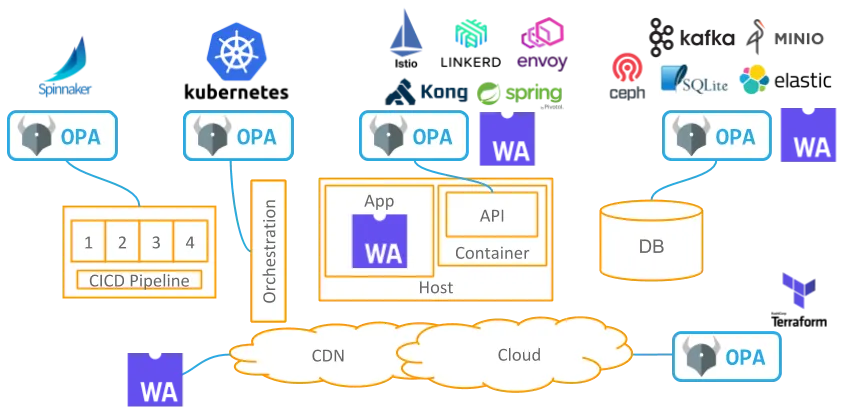
This is where Wasm is relevant because it provides a safe, portable, efficient standards-based execution environment for arbitrary code and logic. In the past year Wasm-based extension mechanisms gained popularity: CDN companies like Cloudflare and Fastly allow you to execute software at the edge using Wasm, service proxies like Envoy have integrated Wasm runtimes, and even databases like Postgres can be extended with Wasm built-in functions.

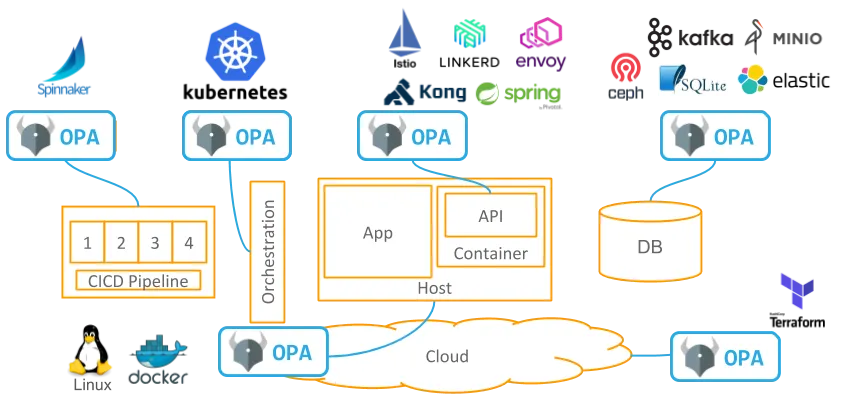
OPA ecosystem diagram with WebAssembly integration points highlighted

With Wasm-based extension mechanisms becoming the norm and programming language support for Wasm runtimes maturing, Wasm will naturally become a standard mechanism for offloading policy evaluation from your software. At the same time, Wasm is only a low-level instruction format. The only data types at your disposal are 32/64-bit integer and floating-point numbers. This makes it impractical to use Wasm directly for any kind of policy specification. Enter OPA.

How does OPA work with Wasm?

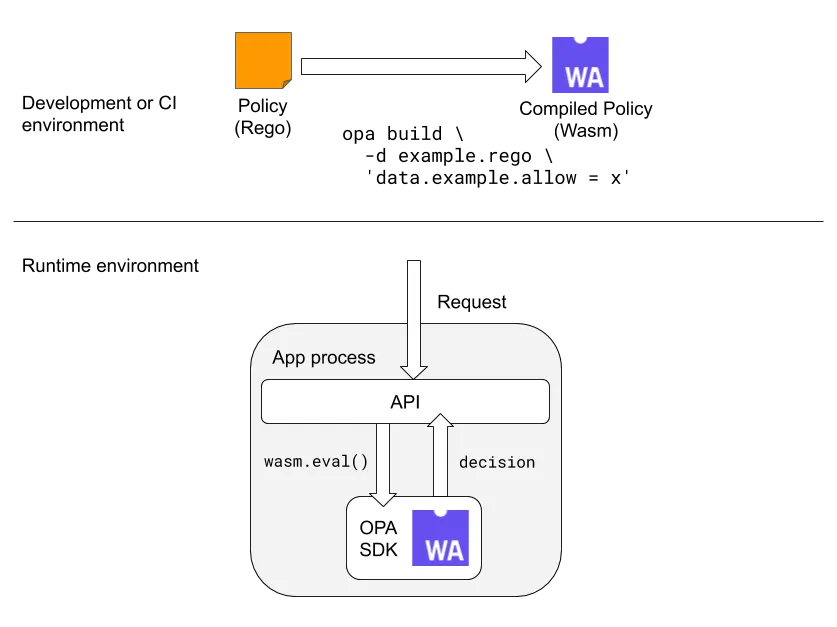
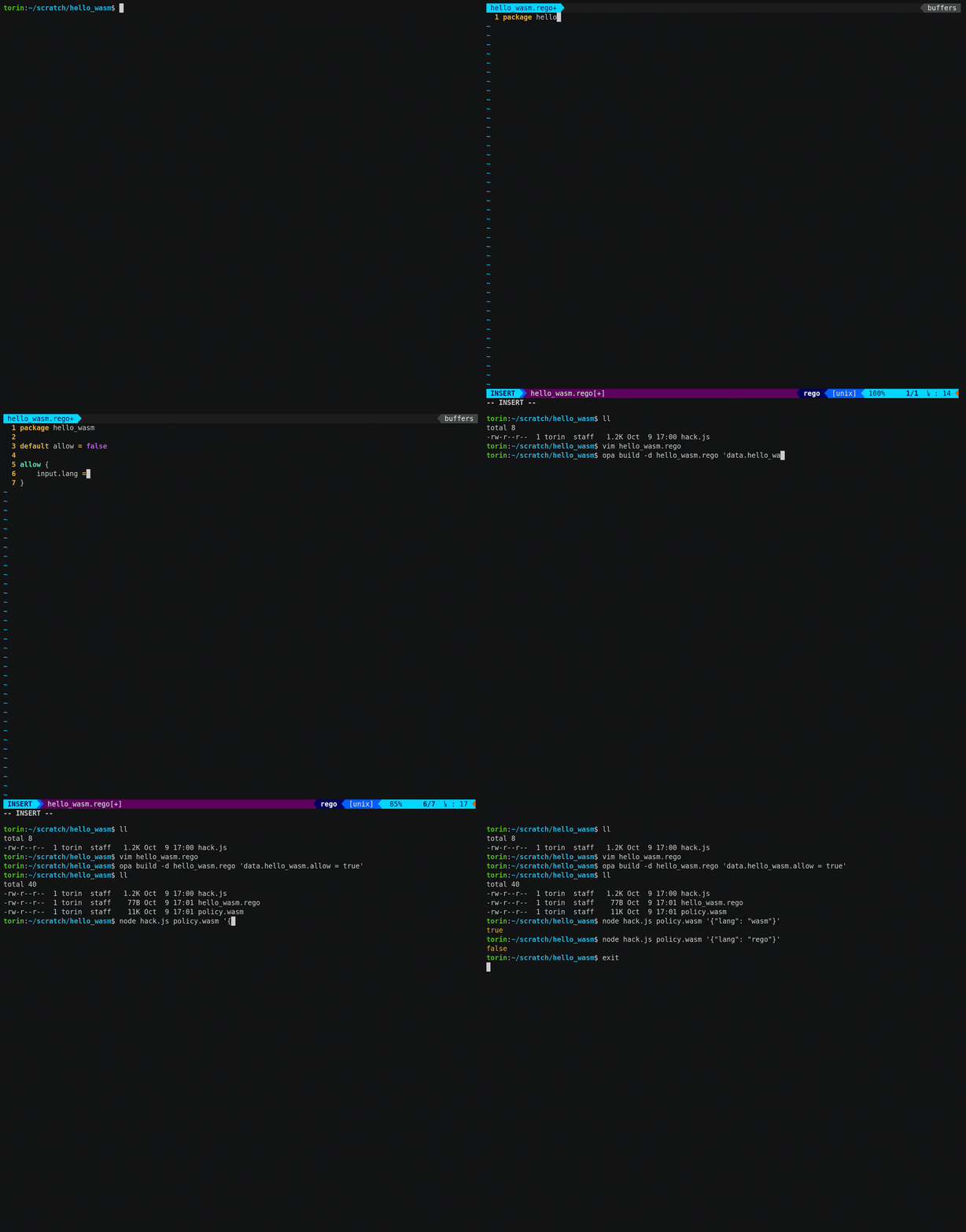
OPA includes a compiler that accepts Rego policies as input and generates an executable Wasm program as output. This Wasm program can be loaded into any standard Wasm runtime and executed when policy decisions are needed. With the v0.15.1 release we have reached an important milestone in the compiler: with the exception of built-in functions, OPA can now compile any Rego policy into Wasm.

In the latest OPA release there are two ways of compiling Rego policies into Wasm:

  • On the command-line using the opa build CLI tool.
  • In Go by integrating with the github.com/open-policy-agent/opa/rego package.

Diagram of the Wasm compile-time and runtime workflow

The compilation process takes a Rego query and zero or more Rego files and generates an execution plan that is compiled into a Wasm module binary. The module binary can then be loaded into any Wasm runtime and executed with different input and data values to obtain decisions. The resulting Wasm module binary sizes are not too significant. The baseline size for a policy with a single statement is ~30KB on disk. A policy containing 300,000 statements consumes ~20MB on disk.

The initial benchmarks comparing policy evaluation time in Wasm versus the existing Go interpreter implemented in OPA are promising. For example, a relatively simple policy that searches over a large number of data items to decide whether an operation should be allowed (or not) evaluates ~20x faster with the Wasm compiled version. This is to be expected because the overhead of the interpreter in OPA has been completely removed.

package example

default allow = false

allow {
rule := data.rules[_]
rule.action == input.action
rule.resource == input.resource
rule.identity == input.identity
}

Benchmark results:

# of data.rules | Existing Go interpreter | Wasm compiled policy
----------------+-------------------------+---------------------
100 | 0.354ms | 0.0173ms
1,000 | 3.1ms | 0.145ms
10,000 | 30ms | 1.5ms
100,000 | 316ms | 15ms

If you are interested in more details about Wasm support in OPA see this page in the documentation and check out this example on GitHub.

What's Next?

We have reached an important milestone for OPA with Wasm and we are excited about Wasm's potential as it relates to policy enforcement. However, there is still a lot left to do.

The main gap (at the moment) is lack of support for the 50+ built-in functions from OPA proper. While you can implement these built-in functions yourself in the host language (e.g., NodeJS) and import them into the Wasm module, we want to make this smoother. Another area that needs work are the management APIs. The OPA daemon and Go library expose APIs that let you control policy distribution, decision logging, and more. In a Wasm-enabled enforcement point these functions do not exist yet.

In the coming months we are going to build out new integrations that leverage Wasm, create SDKs for languages/runtimes other than Go and NodeJS, and use this experience to harden and optimize the new implementation.

If you would like to get involved feel free to file issues on GitHub or join us on Slack.

v0.14 Release

We're excited to announce the v0.14.0 release of OPA. This release includes 147 commits from 17 authors across 9 organizations! For a detailed list of changes see the GitHub releases page. In this latest release we focused on the getting started experience for new users.

Community Updates

Docs, Docs, Docs

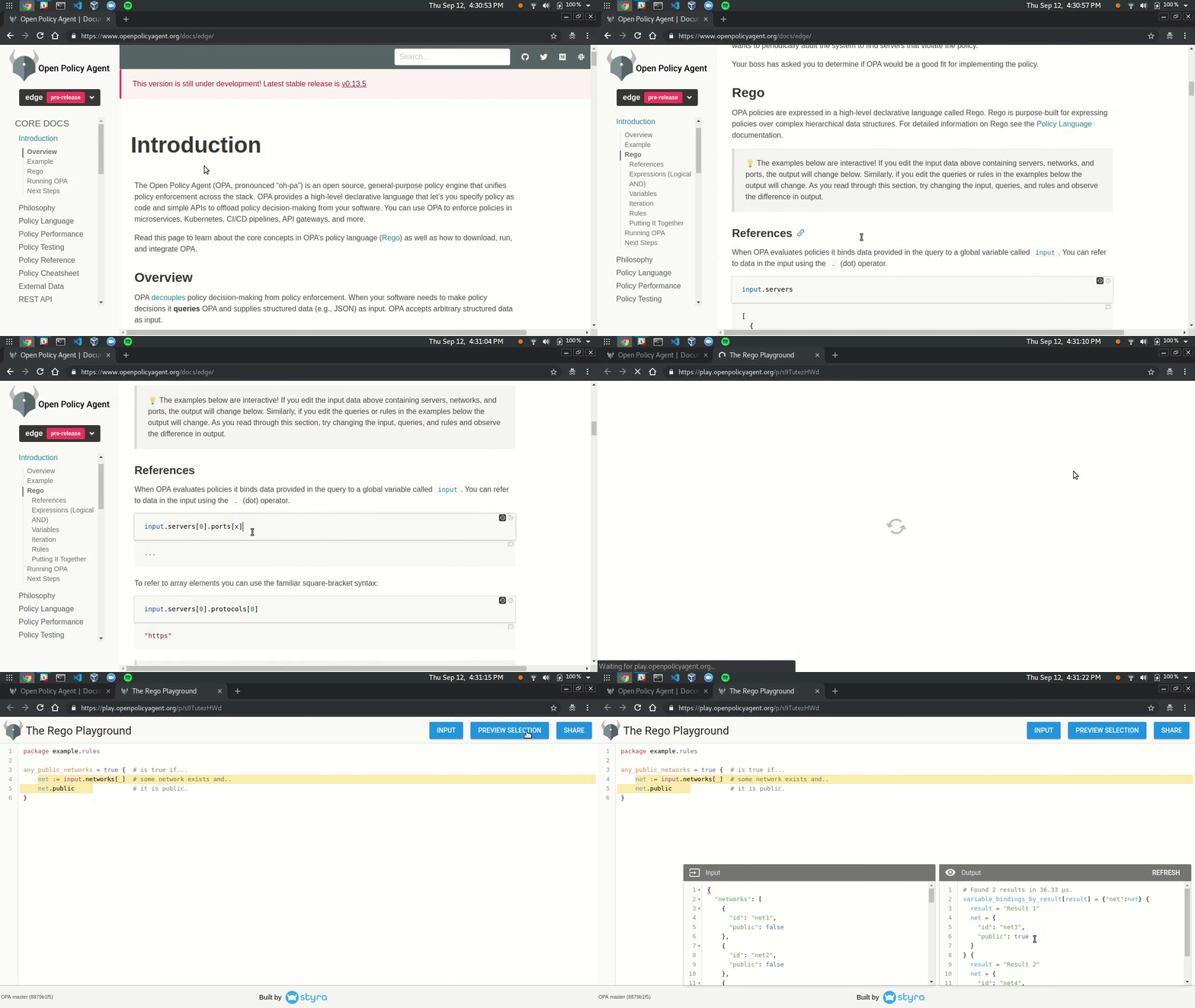
Earlier this year we launched The Rego Playground. The playground provides a way to evaluate and test policies from the browser. Based on positive feedback on the playground we decided to take it further. In the latest version of the docs, policy examples are interactive!

Live Docs!

In addition to "live docs", we have also re-organized and improved the core content. The docs had grown organically since the project launched and it was time for a rethink. The new structure and content aims to get users started with Rego as quickly as possible. We have also begun carving out dedicated sections for popular integrations like Kubernetes admission control. Finally, we added a search integration powered by Algolia.

Performance Optimizations

This release includes a number of optimizations to the AST and other packages. The optimizations focused on heap allocations during evaluation. With the new optimizations we see about ~25% faster evaluation across-the-board for end-to-end benchmarks in OPA:

Test Case Old New Delta
-----------------------------------------------------------
AuthzForbidAuthn-8 32.3µs±1% 30.5µs±1% −5.53%
AuthzForbidPath-8 109µs±1% 85µs±1% −22.14%
AuthzForbidMethod-8 115µs±2% 89µs±1% −22.44%
AuthzAllow10Paths-8 112µs±2% 87µs±0% −22.95%
AuthzAllow100Paths-8 725µs±3% 529µs±3% −27.09%
AuthzAllow1000Paths-8 6.27ms±1% 4.55ms±1% −27.40%

OPA benchmarks are run automatically on a regular basis and compared against the last stable release using the benchstat tool. The results are posted on the benchmark results page.

Improved File Loading in VS Code

The VS Code extension has been updated to use the new -b or --bundle flag on opa eval to avoid loading all JSON and YAML files inside the workspace. While the old file loading approach was acceptable for Rego-specific workspaces it fell over in larger or mixed workspaces (which most people have!)

With the new -b flag and the latest version of the Open Policy Agent extension for VS Code, file loading is much better.

Policy-driven continuous integration with Open Policy Agent

Take sound security policy to the source

One of the things that I love most about Open Policy Agent (OPA) is that it was built to be interoperable with other systems. Anything that produces JSON — and nowadays most things do — can provide OPA with inputs for rendering policy judgments. Due to this interoperability, you can use OPA with container-based development tools like Docker, infrastructure provisioning tools like Terraform, container orchestration platforms like Kubernetes, and that's just scratching the surface.

OPA and continuous integration

Because OPA can integrate with just about anything, virtually every single part of a modern software "stack" can be policy driven, including continuous integration. With OPA you can create policies that govern which artifacts are allowed to be built in the first place, providing a powerful lever for keeping potentially malicious jobs and services from ever running on your systems (make sure those are also governed by OPA policies!).

Incidents like the recent event-stream debacle (see details) — amongst many others — demonstrate just how necessary these safeguards are.

In fact, you're probably already applying policies at the CI level but doing so in an ad hoc way via a loose assemblage of scripts. OPA provides an excellent platform for making those implicit policies explicit and declarative. I'll provide a straightforward example for what policy-driven CI may look like in the next section.

"You're probably already applying policies at the CI level but doing so in an ad hoc way. OPA enables you to make your implicit policies explicit and declarative."

Dependency blacklisting in action

As an example, let's say that I'm a developer working on a Node.js web server in a large organization. That organization enforces CI policies using a policy written in Rego, OPA's policy language. The CI provider is GitHub Actions, though the example could easily be ported to other CI providers. The code for this example is in the lucperkins/opa-ci-example repository on GitHub.

The Rego policy governing package.json dependencies

package ci

# The package.json is presumed faulty
default allow = false

# Packages that aren't allowed
blacklist = {
"event-stream",
"left-pad"
}

# Records dependencies that are on the blacklist
violations[pkg] {
input.dependencies[pkg]
blacklist[pkg]
}

# Returns true only if there are no violations
allow {
count(violations) == 0
}

This policy takes each project's package.json file as an input and applies the policy to that (notice the input.dependencies). Two things to note about the policy:

  • default allow = false means that my package.json dependencies are presumed faulty and must pass muster before the next CI stage (the installation stage) is reached. This is generally a good practice for Rego policies.
  • The violations[pkg] block creates a list of blacklist-violating packages that is returned in the evaluation output in case of violations, making it easier for developers to know why the evaluation is failing.
  • The evaluation succeeds (i.e. the script returns an exit code of 0) only if there are no violations (count(violations) == 0); otherwise, it fails.

So that covers our dependencies policy. Now let's dive into the GitHub Action workflow definition.

The GitHub Actions workflow for this application

workflow "OPA evaluation" {
on = "push"
resolves = ["install"]
}

# Determines whether the policy has been violated
action "evaluate" {
uses = "docker://openpolicyagent/opa:0.11.0"
args = [
"eval",
"--fail-defined", "data.ci.violations[pkg]",
"--input", "package.json",
"--data", "ci.rego",
"--format", "pretty"
]
}

# Installs the dependencies in package.json
# iff the evaluate action succeeds
action "install" {
uses = "nuxt/actions-yarn@master"
args = "install"
needs = "evaluate"
}

There are two Actions in this workflow: evaluate and install (in a more fleshed-out scenario there may be other stages, like build-container or deploy-to-k8s). The evaluate action runs the following script, using the openpolicyagent/opa:0.11.0 Docker image:

opa eval \
--fail-defined 'data.ci.violations[pkg]' \
--input package.json \
--data ci.rego \
--format pretty

The OPA evaluation fails any time the violations[pkg] directive is satisfied, i.e. any time a dependency is both in the dependencies block in package.json and on the package blacklist. The --format pretty flag dictates that the failure output includes a visually appealing table like this:

+----------------+-------------------------+
| pkg | data.ci.violations[pkg] |
+----------------+-------------------------+
| "dependency-1" | "dependency-1" |
| "dependency-2" | "dependency-2" |
+----------------+-------------------------+

If I'm a developer working on this project, I get highly readable, actionable feedback about policy violations directly in the CI output. So how is my build currently faring?

Results

Well… not so good. On my current dev branch, my package.json file looks like this.

The doomed-to-fail package.json

{
"private": true,
"dependencies": {
"event-stream": "^4.0.1",
"express": "^4.17.1",
"left-pad": "^1.3.0"
}
}

I've included two dependencies here — event-stream and left-pad — that very obviously violate the blacklist. You can see the resulting CI failure run. Let's fix this!

This pull request gets the job done. It removes the offending dependencies from the package.json. As you can see from the results of the evaluate action, the opa eval … command returns undefined instead of a table listing violations. And because the evaluate action has passed, the install action has been successfully invoked.

You can see the failing policy and input in action in the Open Policy Agent Playground. Correct the inputs on your own to fix the build!

For another fully fleshed-out example of using OPA as part of a build pipeline, I highly recommend Unit Testing Your Kubernetes Configurations Using Open Policy Agent from Gareth Rushgrove (slides on Speaker Deck), presented at KubeCon/CloudNativeCon EU 2019 in Barcelona.

Though Gareth's project has different aims from mine, it provides a very nice illustration of using OPA to prevent certain classes of problems from ever arising in production environments by vetting Kubernetes configurations.

If you have other examples — blog posts, code snippets, anything — please feel free to add a comment to share your work!

Implications

What I've presented here is just a small taste of what's possible. You could use Open Policy Agent to build a much more robust system of CI checks. To give a few examples, you could write policies for:

  • Linters and formatters, specifying allowable thresholds for deviance from desired norms
  • Code coverage checkers, with requirements specified for each language and domain within your organization
  • Configuration files for systems like Kubernetes, Prometheus, Envoy, and many others
  • Utilize existing integrations with other tools, such as Terraform and Docker, Terraform, Puppet, and other CI-related tools.

Making your production systems policy driven is of the utmost importance, and that has to include sanitizing the inputs to those systems whenever possible. OPA quite simply provides the most robust and flexible platform in the open source world for doing so.

Envoy External Authorization with OPA

Envoy external authorization with OPA banner

Microservices improve productivity of individual development teams by breaking down applications into smaller, standalone parts. However, microservices alone do not solve age-old distributed systems problems like service discovery, authentication, and authorization. In fact, these problems are often more acute due to the heterogenous and ephemeral nature of microservice environments.

As more organizations adopt microservice architectures, the need for decoupled authentication and authorization has become apparent. This post dives into how you can leverage Envoy, SPIFFE/SPIRE, and the Open Policy Agent (OPA) to enforce important security policies in microservice environments.

Background

Envoy is a L7 proxy and communication bus designed for large modern service oriented architectures. Envoy (v1.7.0+) supports an External Authorization filter which calls an authorization service to check if the incoming request is authorized or not. This feature makes it possible to delegate authorization decisions to an external service and also makes the request context available to the service. The request context contains information such as the source of a network activity, destination of a network activity, the network request (eg. http request). All this information can be used by the external service to make an informed decision about the fate of the incoming request received by Envoy.

SPIFFE, the Secure Production Identity Framework for Everyone, is a set of open-source standards for securely identifying software systems in dynamic and heterogeneous environments. Systems that adopt SPIFFE can easily and reliably mutually authenticate wherever they are running. SPIRE (the SPIFFE Runtime Environment) is a toolchain for establishing trust between workloads across a wide variety of platforms.

The Open Policy Agent (OPA) is an open source, general-purpose policy engine that enables unified, context-aware policy enforcement across the entire stack. OPA's high-level declarative language Rego allows authoring of fine-grained security policies and is purpose built for reasoning about information represented in structured documents.

OPA as an External Authorization Service

We will walkthrough an example of using Envoy's External authorization filter with OPA as an authorization service.

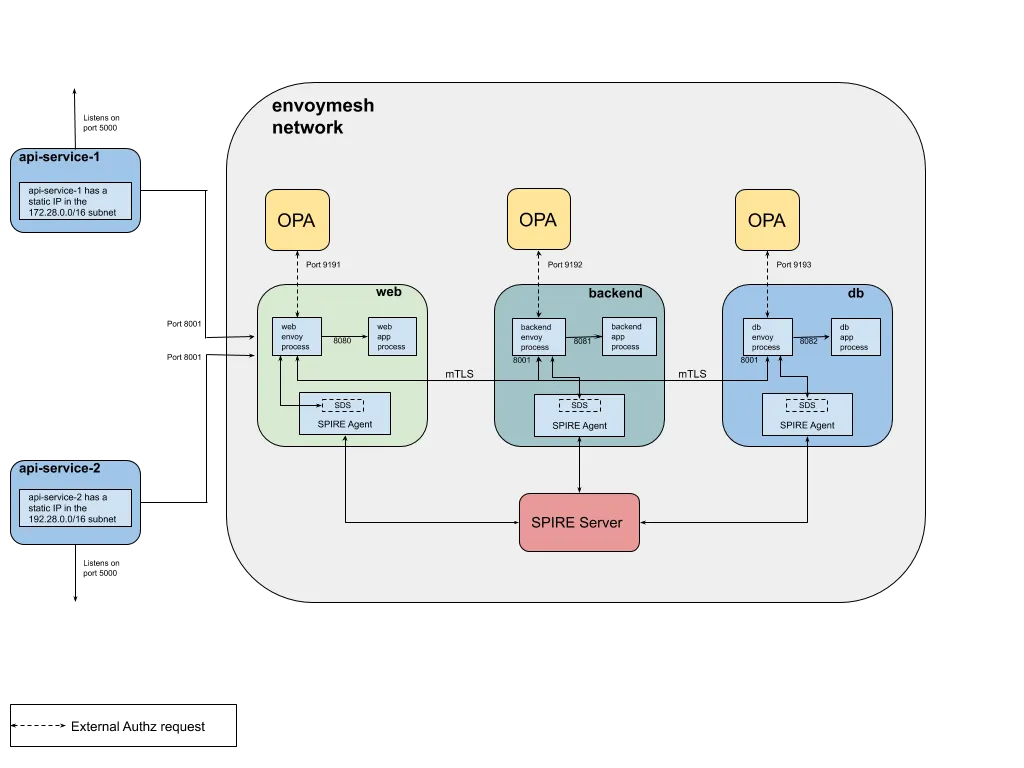
Envoy-OPA External Authorization

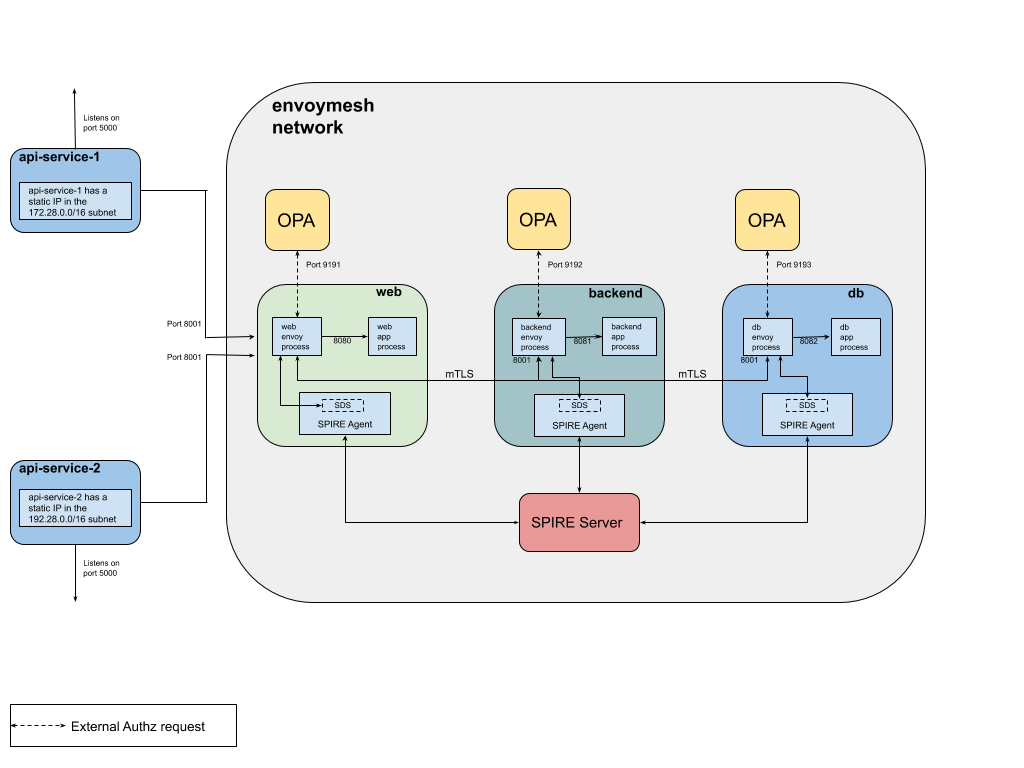
The example consists of three services (web, backend and db) colocated with a running service Envoy. Each service uses the external authorization filter to call its respective OPA instance for checking if an incoming request is allowed or not.

The web service receives all inbound requests from api-server-1 and api-server-2 which are deployed in different subnets. The request is forwarded to the backend service which then calls the db service.

Secure communication between the web, backend and db service is established by configuring the Envoy proxies in each container to establish a mTLS connection with each other. Envoy retrieves client and server TLS certificates and trusted CA roots for mTLS communication from a SPIRE Agent which implements an Envoy SDS. The agent in-turn fetches this information from the SPIRE Server and makes it available to an identified workload. In the following example, SPIRE provides each workload an identity, in the form of a SPIFFE ID embedded in the TLS certificate, to facilitate mTLS communication. The SPIFFE ID of each workload can then be used by OPA to build the authorization policy. More information on SPIRE can be found here.

  • Envoy is listening for ingress on port 8001 in each container.
  • api-server-1 and api-server-2 are flask apps running on port 5000 and 5001 respectively and forward requests to the web service.
  • api-server-1 has a static IP in the 172.28.0.0/16 subnet while api-server-2 has one in the 192.28.0.0/16 subnet.
  • OPA is extended with a GRPC server that implements the Envoy External authorization API.
  • data.envoy.authz.allow is the default OPA policy that decides whether a request is allowed or not.
  • Both the GRPC server port and default OPA policy that is queried are configurable.

Running the Example

Step 1: Install Docker

Ensure that you have recent versions of docker and docker-compose installed.

Step 2: Clone the repo and Start containers

Clone the OPA-Envoy-SPIRE repo with git clone git@github.com:ashutosh-narkar/opa-envoy-spire-ext-authz.git

cd opa-envoy-spire-ext-authz
docker-compose up --build -d
docker-compose ps

The following containers should be running:

Name Command State Ports
----------------------------------------------------------------------------------------------------------------------
opa-envoy-spiffe-ext-authz_api-server-1_1 flask run --host=0.0.0.0 Up 0.0.0.0:5000->5000/tcp
opa-envoy-spiffe-ext-authz_api-server-2_1 flask run --host=0.0.0.0 Up 0.0.0.0:5001->5000/tcp, 5001/tcp
opa-envoy-spiffe-ext-authz_backend_1 /bin/sh -c /usr/local/bin/ ... Up 10000/tcp
opa-envoy-spiffe-ext-authz_db_1 /bin/sh -c /usr/local/bin/ ... Up 10000/tcp
opa-envoy-spiffe-ext-authz_opa_be_1 ./opa_istio_linux_amd64 -- ... Up 0.0.0.0:9192->9192/tcp
opa-envoy-spiffe-ext-authz_opa_db_1 ./opa_istio_linux_amd64 -- ... Up 0.0.0.0:9193->9193/tcp
opa-envoy-spiffe-ext-authz_opa_web_1 ./opa_istio_linux_amd64 -- ... Up 0.0.0.0:9191->9191/tcp
opa-envoy-spiffe-ext-authz_spire-server_1 /usr/bin/dumb-init /opt/sp ... Up
opa-envoy-spiffe-ext-authz_web_1 /bin/sh -c /usr/local/bin/ ... Up 10000/tcp, 0.0.0.0:8001->8001/tcp

Step 3: Start SPIRE Infrastructure

Start the SPIRE Agents and register the web, backend and db servers with the SPIRE Server. More information on the registration process can be found in the SPIRE workload registration guide.

./configure-spire.sh

Step 4: Exercise Ingress Policy

The Ingress Policy states that the web service can ONLY be accessed from the subnet 172.28.0.0/16.

Check that api-server-1 can access the web service.

$ curl -i localhost:5000/hello
HTTP/1.0 200 OK
Content-Type: text/html; charset=utf-8
Content-Length: 29
Server: Werkzeug/0.15.2 Python/2.7.15
Date: Thu, 02 May 2019 21:21:48 GMT

Hello from the web service !

Check that api-server-2 cannot access the web service.

$ curl -i localhost:5001/hello
HTTP/1.0 403 FORBIDDEN
Content-Type: text/html; charset=utf-8
Content-Length: 40
Server: Werkzeug/0.15.2 Python/2.7.15
Date: Thu, 02 May 2019 21:22:12 GMT

Access to the Web service is forbidden.

Step 5: Exercise Service-To-Service Policy

The Service-To-Service Policy policy states that a request can flow from the web to backend to db service.

Check that this flow is honored.

$ curl -i localhost:5000/the/good/path
HTTP/1.0 200 OK
Content-Type: text/html; charset=utf-8
Content-Length: 35
Server: Werkzeug/0.15.2 Python/2.7.15
Date: Thu, 02 May 2019 21:22:50 GMT

Allowed path: WEB -> BACKEND -> DB

Check that the web service is NOT allowed to directly call the db service.

$ curl -i localhost:5000/the/bad/path
HTTP/1.0 403 FORBIDDEN
Content-Type: text/html; charset=utf-8
Content-Length: 26
Server: Werkzeug/0.15.2 Python/2.7.15
Date: Thu, 02 May 2019 21:23:22 GMT

Forbidden path: WEB -> DB

Example OPA Policy

Each service calls its respective OPA instance for a decision and loads its desired policies into OPA. To see the OPA policies loaded by a service checkout the docker directory in the repo.

Example Policy — 1

The following OPA policy used in the example above is loaded into the OPA called by the web service.

web service can ONLY be accessed from the subnet 172.28.0.0/16

import input.attributes.request.http as http_request
import input.attributes.source.address as source_address

default allow = false

allowed_paths = {"/hello", "/the/good/path", "/the/bad/path"}

# allow access to the Web service from the subnet 172.28.0.0/16 for the allowed paths
allow {
allowed_paths[http_request.path]
http_request.method == "GET"
net.cidr_contains("172.28.0.0/16", source_address.Address.SocketAddress.address)
}

Try the OPA-Envoy Ingress policy in the Rego Playground!

Example Policy — 2

Another policy used in the example states that:

a request can flow from the web to backend to db service

Below is a policy snippet that is loaded into the OPA called by the db service. This policy allows requests to the db service from ONLY the backend service.

package envoy.authz

import input.attributes.request.http as http_request
import input.attributes.source.address as source_address

default allow = false

# allow Backend service to access DB service
allow {
http_request.path == "/good/db"
http_request.method == "GET"
svc_spiffe_id == "spiffe://domain.test/backend-server"
}

svc_spiffe_id = client_id {
[_, _, uri_type_san] := split(http_request.headers["x-forwarded-client-cert"], ";")
[_, client_id] := split(uri_type_san, "=")
}

Try the OPA-Envoy Service-Service policy in the Rego Playground!

X-Forwarded-Client-Cert header is injected by the Envoy proxy of the originating service and validated by the Envoy proxy of the destination service. Envoy is configured to forward the URI field in the client certificate. To identify the service making the request, this policy uses the URI field of the X-Forwarded-Client-Cert header which in this case is the SPIFFE ID of the backend server.

x-forwarded-client-cert (XFCC) is a proxy header which indicates certificate information of part or all of the clients or proxies that a request has flowed through, on its way from the client to the server. More information about the header and it's supported keys can be found in the Envoy HTTP headers documentation.

Example Envoy configuration

Here's an example configuration for an Envoy proxy that listens for HTTP client connections on port 80 and then calls OPA's gRPC server that implements the Envoy External Authorization API.

static_resources:
listeners:
- address:
socket_address:
address: 0.0.0.0
port_value: 80
use_original_dst: true
filter_chains:
- filters:
- name: envoy.http_connection_manager
typed_config:
"@type": type.googleapis.com/envoy.config.filter.network.http_connection_manager.v2.HttpConnectionManager
codec_type: auto
stat_prefix: ingress_http
access_log:
- name: envoy.file_access_log
config:
path: "/dev/stdout"
route_config:
name: local_route
virtual_hosts:
- name: backend
domains:
- "*"
routes:
- match:
prefix: "/hello"
route:
cluster: web-service
- match:
prefix: "/the/good/path"
route:
cluster: web-service
- match:
prefix: "/the/bad/path"
route:
cluster: web-service
http_filters:
- name: envoy.ext_authz
config:
failure_mode_allow: false
grpc_service:
google_grpc:
target_uri: opa:9191
stat_prefix: ext_authz
timeout: 0.5s
- name: envoy.router
config: {}
clusters:
- name: web-service
connect_timeout: 0.25s
type: strict_dns
lb_policy: round_robin
http2_protocol_options: {}
load_assignment:
cluster_name: web-service
endpoints:
- lb_endpoints:
- endpoint:
address:
socket_address:
address: web-service
port_value: 80
admin:
access_log_path: "/dev/null"
address:
socket_address:
address: 0.0.0.0
port_value: 8001

And that's it

And that's how you use OPA as an External authorization service to enforce ingress and service-to-service security policies using Envoy's External authorization filter. OPA leverages the authentication framework provided by SPIFFE/SPIRE and by configuring Envoy to forward client certificate details, OPA is able to make authorization decisions based on the SPIFFE ID included in the URI SAN of the client X.509 certificate.

Source Code

The code for the example can be found at https://github.com/open-policy-agent/opa-envoy-spire-ext-authz.

The Rego Playground

OPA gives you a high-level declarative language for authoring policies as code, called Rego. Today we're excited to launch The Rego Playground, a new interactive tool for writing, testing, and sharing Rego policies.

The initial version of The Rego Playground has support for:

  • Syntax highlighting that makes policies easier to read and write.
  • Interactive evaluation of expressions, queries, rules, and packages.
  • Input dialog to specify complex JSON inputs for your policy.
  • Sharing so that you can link to policies online.

We hope the playground makes it easy for people to try out new policies and learn the language. We plan to keep improving the playground and eventually embed it into the OPA documentation. Check out the video below for a demo of the playground and its features.

Watch: Rego Playground Demo

Securing the Kubernetes API with Open Policy Agent

Banner image for securing the Kubernetes API with OPA

Kubernetes is being rolled out for production — it's mission critical. But it presents unique challenges around the age-old problem of who-can-do-what. Those challenges are exactly the ones the Open Policy Agent was designed to solve.

TL;DR

This post highlights several key ideas:

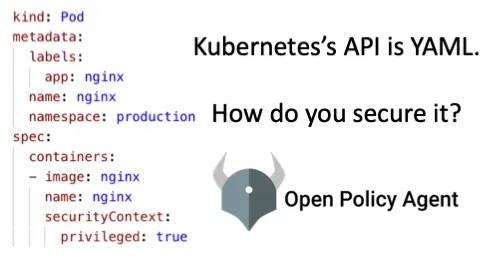
  • Controlling who-can-do-what on Kubernetes has unique challenges because to make an access control decision you need to inspect an arbitrary chunk of YAML, e.g. the images in all containers in all pods must come from a trusted repository.
  • The Open Policy Agent was designed around the premise that sometimes you need to write and enforce access control decisions over arbitrary JSON/YAML, so it's a perfect match for Kubernetes's challenges.
  • OPA supports a class of access control decisions called "context-aware" that enable you to make decisions based on the Kubernetes resources already in the cluster, e.g. no conflicting ingresses.

KubeCon Seattle 2018 Debrief

After each KubeCon we try to document the answer to the question we heard most often while talking to folks at the Open Policy Agent (OPA) booth. For those who don't know, OPA is a general-purpose policy engine for the cloud-native stack and has been applied to solve policy and authorization problems in several different domains, e.g. microservice authorization, data protection, ssh/sudo control, terraform risk-analysis, and most popular at KubeCon this year: Kubernetes admission control. The most common question we heard was

Why is OPA so well-suited for securing the Kubernetes API through admission control?

People heard about this use case in several different talks throughout the week, which is why we think so many people were asking about it at the booth. Here are links to those talks:

In this post, when we talk about securing the Kubernetes, we're talking about the Kubernetes API itself — the container management system. We're talking about helping you, the Kubernetes cluster admin, put guardrails in place so that the developers running applications on top of Kubernetes don't need be constantly referring to wikis or PDFs that detail what policies the organization has decided on around Kubernetes. OPA lets you codify those wikis and PDF policies into policy-as-code and enforce them directly on the cluster. For example:

  • every container image must come from a trusted, corporate repository
  • every application exposed to the internet must use an approved domain name
  • every resource must include a costcenter label
  • business critical storage volumes must use the retain storage policy

One thing people sometimes mean when they say "Kubernetes" is the applications running on top of the Kubernetes container management system. That's another use case for OPA, but not the one covered in this post. Here are a few references if you're interested in using OPA to provide API security for cloud-native applications themselves (whether or not they run on Kubernetes).

The Kubernetes YAML-centric API

The key reason OPA is such a good choice for securing Kubernetes is that the Kubernetes API is pretty unique, and that presents challenges for authorization and API security. Within the community people refer to it as the Kubernetes Resource Model (Brian Grant's doc, Tim Hockin tweet).

Each Kubernetes API call requires you to specify the desired-state for one of Kubernetes's many objects: pods, services, ingresses, deployments, etc. For example, here is you define the desired state for an nginx workload.

# nginx-pod.yaml
kind: Pod
apiVersion: v1
metadata:
name: nginx
labels:
app: nginx
spec:
containers:
- image: nginx
name: nginx

To create this workload, you use kubectl and hand it the YAML file (-f) above.

kubectl create -f nginx-pod.yaml

Updates happen similarly. Say you want to change the version of nginx, mount an external volume, or provide additional configuration. You update the nginx-pod.yaml file to whatever the desired state should be and use kubectl again, this time using apply instead of create.

kubectl apply -f nginx-pod.yaml

The Challenge of Securing the Kubernetes API

Imagine now that you want to require all images to come from a trusted repository (say, hooli.com). Anytime someone runs, say,kubectl create, the access control system needs to make a decision based on the user, the action create and the YAML that describes the pod, e.g.

kind: Pod
metadata:
labels:
app: nginx
name: nginx-1493591563-bvl8q
namespace: production
spec:
containers:
- image: nginx
name: nginx
securityContext:
privileged: true
- image: hooli.com/frontend
name: frontend
securityContext:
privileged: true
dnsPolicy: ClusterFirst
nodeName: minikube
restartPolicy: Always

To make the right decision, the access control system needs to extract the list of image names (e.g. nginx and hooli.com/frontend) and do string manipulation to extract the name of the repository (e.g. the default repo and hooli.com). To complicate matters, Kubernetes supports Custom Resource Definitions, which means we can't just build an access control system that knows the layout of these YAML files. We need the access control system to be expressive enough for all of the following:

  • Descending through the hierarchical structure of a YAML file.
  • Iterating over elements in an array.
  • Manipulating strings, IPs, numbers, etc.

Securing the Kubernetes API with Open Policy Agent

This is where the Open Policy Agent shines. OPA was designed to express access control policies (as well as other kinds of policies) over arbitrary JSON/YAML, along with a complete toolkit for testing, dry-running, auditing, profiling, and integrating those policies into third party projects. The list of requirements from the last section are first-class citizens in OPA's policy language: dot-notation, iteration, and built-in functions. That means that encoding the policy that says, "all images must come from the repository hooli.com" is just a few lines in OPA.

# deny any pod with an image not from the repository hooli.com
deny {
image_name := input.spec.containers[_].image
not startswith(image_name, "hooli.com")
}

The logic shown above denies the API call if there is ANY container in the pod whose image fails to start with hooli.com. If you want to understand how the code works, the following notes should help:

  • input is an OPA keyword that stores the JSON/YAML document representing the Kubernetes YAML shown earlier.
  • The dot-notation (e.g. input.spec.containers) does the obvious thing — descending through the YAML hierarchy.
  • The underscore (_) iterates over all the containers. If the body of the deny rule is true for ANY of the containers in the array, the pod is rejected. Note: iteration is not limited to only _ — see the docs for details.
  • startswith is one of 50+ builtins for string, numeric, IP, etc. manipulation.

OPA's Context-aware Kubernetes Policies

That image-repository example is actually one of the simpler access control policies you might need to write for Kubernetes because you can make the decision using just the one YAML file describing the pod. But sometimes you need to know what other resources exist in the cluster to make an allow/deny decision. For example, it's possible to accidentally create two applications serving internet traffic using Kubernetes ingresses where one application steals traffic from the other. The policy that prevents that needs to compare a new ingress that's being created/updated with all of the existing ingresses. That leads to another requirement for a Kubernetes access control system that OPA supports:

  • Conditioning decisions based on external information about the world.

To see the OPA policy that prohibits conflicting ingresses, here is an example ingress YAML.

kind: Ingress
metadata:
name: test-ingress
annotations:
nginx.ingress.kubernetes.io/rewrite-target: /
spec:
rules:
- http:
paths:
- path: /testpath
backend:
serviceName: test
servicePort: 80

Below is the (essence of the) OPA policy that stops an ingress from being created/updated if there is an existing ingress that it would conflict with.

deny {
input.kind == "Ingress"
host := input.request.object.spec.rules[_].host
host == data.kubernetes.ingresses[_][_].spec.rules[_].host
}

The only new part of this policy is the reference to data.kubernetes. Below are some notes explaining that code.

  • data is a keyword in OPA (similar to input) that stores all of the information about the external world.
  • The reference data.kubernetes.ingresses is a dictionary mapping each namespace into the array of ingresses in that namespace.
  • data.kubernetes.ingresses[_][_] iterates over all ingresses over all namespaces.
  • The last line checks if the host for the new/updated ingress is the same as the host on any of the rules over any of the ingresses in any namespace. (3 "any"s means you need 3 underscores.)

How you load information about the external world into OPA varies depending on the use case and the kind of data. Typically the information loaded into OPA is eventually-consistent, meaning it's a copy of the data and could be out of date — whether that matters depends entirely on the use case and can be mitigated by using OPA's offline auditing capabilities. To load Kubernetes data, OPA has a sidecar that watches the API server to replicate Kubernetes resources into OPA.

In this post, we've given 2 simple and common examples of policies using the core Kubernetes objects (pods and ingresses), but there's nothing special about those resources. If you're using Custom Resource Definitions, you can still go ahead and write whatever policies you need, e.g. knative or istio. Any resource managed by Kubernetes is something you can write policy over with OPA — as far as OPA is concerned they're all just YAML/JSON.

Summary

In this post, we dug into the API security challenges faced by Kubernetes and how OPA addresses those challenges.

  • Kubernetes's API is YAML-centric, meaning that the arguments to API calls are (at least conceptually) arbitrary chunks of YAML.
  • A YAML-centric API is challenging for access control because it requires analyzing that YAML to make a decision. For example, the policy "ensure all images come from a trusted repository" requires navigating the YAML to find the list of all containers, iterating over that list, extracting the image name, and string-parsing that image name to extract the repository.
  • The Open Policy Agent's declarative policy language was designed to express policy over arbitrary JSON/YAML, so it includes implicit iteration, dot-notation, and 50+ builtins.
  • OPA also supports context-aware policies that let you analyze both the resource that a user is trying to create/update and all of the other Kubernetes resources that already exist. It's all just JSON/YAML to OPA. For example, the policy "prohibit ingresses with conflicting hostnames" requires comparing any new ingress that is being created to all the existing ingresses.

v0.10 Release

OPA v0.10.0 release announcement banner animation

We're excited to announce the v0.10.0 release of OPA. This release contains more than 60 commits from 8 authors across 5 organizations. For a detailed list of changes see the GitHub releases page.

WebAssembly

This release adds experimental support for compiling OPA policies into WebAssembly (Wasm) binaries that can be executed in any Wasm runtime (e.g., V8).

The compiler is designed to be lightweight and embedded inside other programs. The package does not depend on any third-party compiler toolchains like LLVM or Wasm-specific toolchains like Emscripten. The compiled policies are fairly small in size (10KB for toy examples) and have no system call dependencies — making them easy to instantiate inside your app, serverless function, etc.

We are excited about the potential that Wasm brings to the policy enforcement space because it provides a portable, secure, and efficient runtime for answering policy queries. You can find out more about Wasm at https://webassembly.org/.

If you are feeling adventurous, you can try out the Wasm compiler today with the new opa build command. We only support a limited subset of the language today but we plan to extend coverage over the next few months. If you run into any problems, please file an issue on GitHub.

Improved Test Support with Data Mocking

This release adds support for replacing (or mocking) values under the data document using the with keyword. You can use the with keyword to replace both external JSON loaded into OPA as well as JSON generated by rules.

Prior to v0.10, OPA only allowed you to replace values under the input document. This made it hard to test contextual policies using OPA's test framework. For example, the following policy depends on "roles" data being loaded into OPA:

package authz

import data.roles

default allow = false

allow {
input.method == "GET"
input.subject.role == roles[_]
}

In v0.10.0, you can write a test rule that mocks the value of data.roles using the with keyword:

# Define some dummy inputs.
dev_input = {"method": "GET", "subject": {"role": "dev"}}
hr_input = {"method": "GET", "subject": {"role": "hr"}}

# Define some dummy role data.
fake_roles = ["hr"]

# Test the allow rule.
test_allow {
allow with input as hr_input with data.roles as fake_roles
not allow with input as dev_input with data.roles as fake_roles
}

Partial Evaluation: Negation Optimization

Earlier this year we added a feature called Partial Evaluation that helps pre-compute portions of your policy. Today, a large fragment of the language is covered by Partial Evaluation but some constructs are not fully supported.

Prior to v0.10, OPA would generate support rules for negated expressions (which can be difficult to post-process.) This was required because Rego queries only consist of a series of expressions AND-ed together. If you need to express an OR condition, you need multiple queries. When you negate an expression (e.g., not deny), the in-lined result may be a series of expressions OR-ed together. For example, given the following policy that says (in English) "no one is allowed to buy more bitcoin or eat pizza":

allow {
not deny
}

deny {
input.action = "buy"
input.resource = "bitcoin"
}

deny {
input.action = "eat"
input.resource = "pizza"
}

We can partially evaluate the deny rule to yield the following simplified queries:

+---------+----------------------------+
| Query 1 | input.action = "buy" |
| | input.resource = "bitcoin" |
+---------+----------------------------+
| Query 2 | input.action = "eat" |
| | input.resource = "pizza" |
+---------+----------------------------+

However, it's a bit trickier to partially evaluate the allow rule. OPA does not allow you to negate multiple expressions at once (you have to factor those expressions into a separate rule). In some cases though, it's reasonable to in-line the result of partially evaluating a negated expression by computing the cross-product. In this case the answer is:

+---------+--------------------------------+
| Query 1 | not input.action = "buy" |
| | not input.action = "eat" |
+---------+--------------------------------+
| Query 2 | not input.action = "buy" |
| | not input.resource = "pizza" |
+---------+--------------------------------+
| Query 3 | not input.resource = "bitcoin" |
| | not input.action = "eat" |
+---------+--------------------------------+
| Query 4 | not input.resource = "bitcoin" |
| | not input.resource = "pizza" |
+---------+--------------------------------+

By in-lining negated expressions like this, we avoid the need for support rules (which are more difficult to optimize and translate into other languages like SQL and Elasticsearch.) Of course, the size of the cross-product can get quite big, so we put a cap on what OPA will in-line.

More Great Contributions

This release also included a many other contributions from members of the community. Here are some highlights:

Write Policy in OPA. Enforce Policy in SQL.

This post explains how to use OPA and SQL to protect access to sensitive data in your services without impacting consistency, performance, or scalability. We show how to translate OPA policies into SQL and enforce them within the database.

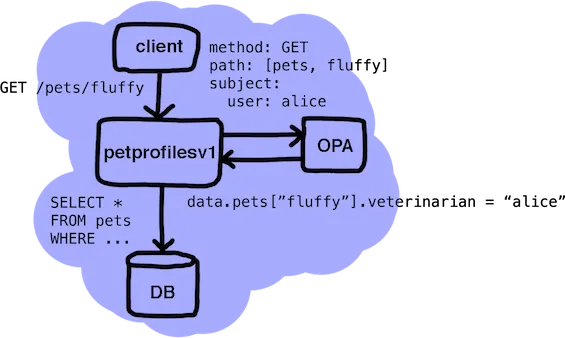
Throughout this post we will refer to a hypothetical service (petprofilesv1) used by a chain of veterinary clinics. The service exposes an HTTP API that serves profiles for pets at the clinics. The service implements the HTTP API by querying a SQL database and returning the results.
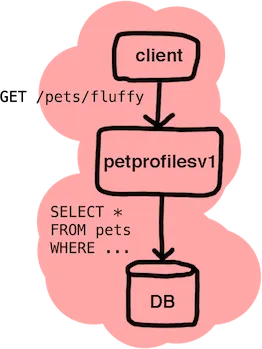
Client sends GET /pets/fluffy to petprofilesv1, which queries the DB

Services like petprofilesv1 often implement authorization policies that depend on attributes of the objects being accessed. They often also include authorization policies that must be applied to filter data in API results.

In this post, we dive into how services can integrate with OPA to enforce these kinds of authorization policies.

Replicating Context Is Hard

Imagine we want to enforce a simple role-based authorization policy in our hypothetical service that says:

"Only veterinarians are allowed to read pet profiles."
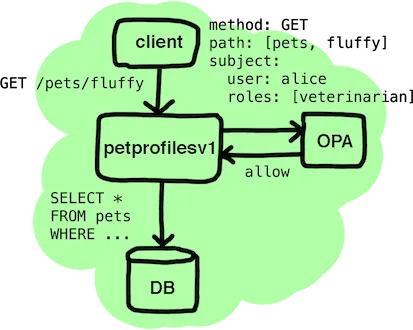
Client and petprofilesv1 query OPA with method/path/subject roles and receive an allow response

To implement this policy we could create a simple allow rule in OPA:

default allow = false

allow = true {
input.method = "GET"
input.path = ["pets", name] # name unused for now
input.subject.roles[_] = "veterinarian"
}

When the service queries OPA, it provides the identity of the caller (input.subject), the operation being performed (input.method), and the resource being operated on (input.path). The response from OPA indicates whether the request should be allowed (true) or denied (false).

This model works well when all of the context required for the decision is carried in the request. But what happens if the incoming request does not include the necessary context? For example, suppose the policy should say:

"Only the treating veterinarian is allowed to read a pet's profile."

In this case, a mapping from pet to treating veterinarian is required but not included in incoming HTTP GET requests.

One way of solving this would be to have the service fetch relevant context and provide it as input to the policy query:

allow = true {
input.method = "GET"
input.path = ["pets", name] # name unused for now
input.subject.user = input.pet.veterinarian
}

This approach works well for small inputs and keeps the enforcement model relatively simple.

The downside is that it requires the service to know the exact context required by the policy. Each API endpoint exposed by the service (or set of services) could need custom logic to fetch the context to provide as input to the policy query. Tight coupling between the service and the policy is difficult to maintain over time. Moreover, as the size of the input grows, it may become prohibitive to fetch and supply context on every query.

Another approach is to have the pet-veterinarian mapping replicated into OPA and cached in-memory. This approach requires an additional component to act as a data source (DS) that gathers the extra context required by policies and loads it into OPA.
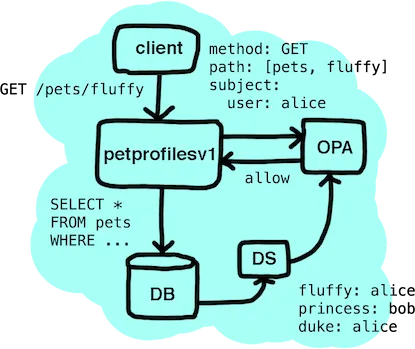
A DS component feeds pet-veterinarian mappings into the DB, which OPA and petprofilesv1 use to make the allow decision

If we used this approach, we could rewrite the OPA rule as follows:

allow = true {
input.method = "GET"
input.path = ["pets", name]
data.pets[name] = input.subject.user
}

This avoids directly coupling the service with the policy. However, the obvious challenge is that OPA must maintain a cache of all pet-veterinarian mappings to authorize requests correctly. Depending on the size of the mapping and the consistency requirements of the service, this may not be feasible: OPA may not have the up-to-date mappings while evaluating the policy.

We could also use built-in functions in OPA to execute HTTP requests or query external databases during policy evaluation however this approach makes policies harder to test in isolation and the extra network hop negatively impacts latency and availability. Similarly, this approach may also violate the service's consistency requirements.

Lists Require Filtering

In addition to challenges with replication, we also have to deal with APIs that return lists of resources.

When designing service APIs, it's common to expose a list operation to return all the resources in a collection (e.g., the petprofilesv1 service needs to expose GET /pets). Since list operations frequently return the same information (for each resource) as reads for individual resources, it's important that we apply the authorization policy to filter elements in the result.

While we could execute a policy query for each resource (or structure the policy to accept a list of resources to authorize access to), this approach complicates pagination models and does not scale well compared to filtering in the data store.

Partial Evaluation

In the first section of this post we explained why it may be difficult to replicate context into OPA in a reliable, maintainable, and performant manner.

As of the latest release of OPA (v0.9), services can leverage the Partial Evaluation feature to avoid replicating context into OPA. When services use Partial Evaluation, they specify what portions of the data or input documents are unknown. When OPA evaluates the policy, any statements that depend on unknown values are not evaluated — they are saved and returned to the caller.

By partially evaluating authorization policies, OPA can treat context that's unavailable during evaluation as unknown. For example, statements that depend on the pet-veterinarian mapping would be saved and returned to the caller.
Partial evaluation output: the unresolved condition data.pets.fluffy.veterinarian = "alice" is returned alongside OPA

The table below shows the output when the service queries OPA for a request from alice trying to access fluffy's profile.

+----------+-------------------------------------------------------+
| Policy | allow { |
| | input.method = "GET" |
| | input.path = ["pets", name] |
| | data.pets[name].veterinarian = input.subject.user |
| | } |
+----------+-------------------------------------------------------+
| Input | { |
| | "method": "GET", |
| | "path": ["pets", "fluffy"], |
| | "subject": {"user": "alice"} |
| | } |
+----------+-------------------------------------------------------+
| Unknowns | [data.pets] |
+----------+-------------------------------------------------------+
| Output | data.pets["fluffy"].veterinarian = "alice" |
+----------+-------------------------------------------------------+

When OPA partially evaluates policies, the output is a simplified version of the policy. The result of partial evaluation can be interpreted as a sequence of Rego expressions ANDed and ORed together:

( expr-1 AND expr-2 AND … ) OR ( expr-N AND expr-N+1 AND … ) OR …

If we extend the policy to allow pet owners to access their pet's profiles and require that veterinarians be signed in from a device at the pet's clinic, the output would include two queries (which can be ORed):

+----------+-------------------------------------------------------+
| Policy | allow { |
| | input.method = "GET" |
| | input.path = ["pets", name] |
| | data.pets[name].owner = input.subject.user |
| | } |
| | |
| | allow { |
| | input.method = "GET" |
| | input.path = ["pets", name] |
| | data.pets[name].veterinarian = input.subject.user |
| | data.pets[name].clinic = input.subject.location |
| | } |
+----------+-------------------------------------------------------+
| Input | { |
| | "method": "GET", |
| | "path": ["pets", "fluffy"], |
| | "subject": { |
| | "user": "alice", |
| | "location": "SOMA" |
| | } |
| | } |
+----------+-------------------------------------------------------+
| Unknowns | [data.pets] |
+----------+-------------------------------------------------------+
| Output 1 | data.pets["fluffy"].owner = "alice" |
+----------+-------------------------------------------------------+
| Output 2 | data.pets["fluffy"].veterinarian = "alice"; |
| | data.pets["fluffy"].clinic = "SOMA" |
+----------+-------------------------------------------------------+

In some cases, OPA can still determine that a request should be allowed or denied unconditionally. In these cases, OPA returns a single empty query or no queries at all (respectively.) For example, if the input above was missing the subject field, neither allow rule would match (even partially) and the result would be empty.

By returning the simplified remainder of the policy to the service, we avoid evaluating the entire policy in one place — which means we do not have to replicate all of the context into OPA. The tradeoff is that the response from OPA is not simply an allow (true) or deny (false) value anymore — it's a set of Rego queries that must be evaluated by something (eventually).

This section explained how we can avoid replicating context into OPA using Partial Evaluation. However, this only solves part of the problem. If the service were to evaluate the result of Partial Evaluation itself, the service would still have to fetch the additional context from the data store (which would likely result in a solution with the same issues as before.)

Enforcing OPA policies with SQL

To overcome the issues we outlined above, the remainder of the policy needs to be evaluated as close to the data as possible — inside the database.

Since OPA policies are essentially just queries, the translation from Rego into another query language, like SQL, is relatively easy. As long as the policies expressed in Rego do not perform joins, we can translate sets of Rego queries into SQL expressions that get appended onto WHERE clauses. For example, the last policy from above says that:

"Pet owners can access their own pet's profiles." "Veterinarians can access pet profiles from devices at the clinic."

We can express this policy in OPA as follows:

package petclinic.authz

default allow = false

allow {
input.method = "GET"
input.path = ["pets", name]
allowed[pet]
pet.name = name
}

allowed[pet] {
pet = data.pets[_]
pet.owner = input.subject.user
}

allowed[pet] {
pet = data.pets[_]
pet.veterinarian = input.subject.user
pet.clinic = input.subject.location
}

In this example we have factored the authorization decision into helper rules named allowed. The allowed rules generate a set of pets the user is allowed to see.

To integrate with OPA, the service invokes the Compile API and marks the data.pets path as unknown. For example, when fluffy's veterinarian alice requests the profile from a device at the clinic, the query to OPA looks like this:

{
// The policy query to run.
"query": "data.petclinic.authz.allow = true",
// The input document to use.
"input": {
"method": "GET",
"path": ["pets", "fluffy"],
"subject": {
"user": "alice",
"location": "SOMA"
}
},
// The values to treat as unknown during evaluation.
"unknowns": ["data.pets"]
}

The response from OPA contains two queries:

# Query 1
pet = data.pets[_];
pet.owner = "alice";
pet.name = "fluffy"

# Query 2
pet = data.pets[_];
pet.veterinarian = "alice";
pet.clinic = "SOMA";
pet.name = "fluffy"

The service can consume these responses by translating them into SQL WHERE clauses. To keep things simple we can interpret references like data.pets[_].owner as follows:

  • The prefix data.pets refers to the pets table in SQL.
  • The variable _ refers to a row in the pets table.
  • The suffix owner refers to a column in the pets table.

With this interpretation we would produce the following SQL expression:

(pets.owner = "alice" AND pets.name = "fluffy") OR
(pets.veterinarian = "alice" AND
pets.clinic = "SOMA" AND
pets.name = "fluffy")

To show how you can implement a library that converts a fragment of Rego into SQL WHERE clauses, we have prepared an example that includes a library. You can find the example on GitHub in the OPA contrib repository.

Data Filtering with OPA

In addition to the API to get individual pet profiles, our service also exposes an API to list pet profiles (e.g,. GET /pets). In many APIs, list operations return the full extent of the resources in the collection. Because of this, it's important to apply the same data authorization policy there.

Even if the list operations only returned a subset of fields (e.g., the resource ID), it's a common requirement to not show clients the IDs of resources they are not allowed to access, so the filtering policy should still be applied.

We can extend the policy from above to cover list operations by adding the following rule:

allow {
input.method = "GET"
input.path = ["pets"]
allowed[pet]
}

This rule is similar to the ones from earlier. The only differences are that it matches on the path ["pets"] (instead of ["pets", name]) and there is no condition on pet.name.

The result sent back to the service from OPA will be similar to the cases above. For example, if alice tries to list the pet profiles from the same device at the SOMA clinic the response from OPA will be:

# Output #1
pet = data.pets[_]
pet.owner = "alice"

# Output #2
pet = data.pets[_]
pet.veterinarian = "alice";
pet.clinic = "SOMA"

These statements will get translated into a SQL WHERE clause that return all of the pet profiles that alice is allowed to see at the SOMA clinic as well as any profiles of her own pets at any clinic:

(pets.owner = "alice") OR
(pets.veterinarian = "alice" AND pets.clinic = "SOMA")

This example highlights how you can reuse the same data authorization policy across both the get and list APIs.

Try It Out

You can try out this new capability with the latest release of OPA. If you integrate with OPA in Go, you can use the rego.Rego#Partial function to invoke Partial Evaluation and obtain a set of conditions to apply to incoming requests. Similarly, if you integrate with OPA via HTTP, you can use the new Compile API to obtain identical conditions (represented in JSON) that you can process in any language.

We have also published a small example that shows how to integrate a simple Python service backed by SQLite. The example includes a Python module that translates Rego queries into SQL predicates. The example includes additional support for policies that perform joins as well as relational operators like !=, <=, >=, etc.

Wrap Up

This post explored how you can leverage OPA to enforce context-aware authorization policies that go way beyond simple protocol-level approaches. By using Partial Evaluation to obtain conditions that you evaluate in your service or via database queries, you can implement data protection and filtering policies in your service that are correct, maintainable, consistent, performant, and scalable.

We anticipate these OPA features will be used to solve a number of interesting problems in the authorization space, such as multi-tenancy support and protection of PII and other sensitive data.

Next we plan to tackle:

  • Integrations with other kinds of databases, e.g., Elasticsearch.
  • Tooling to identify when policies exceed the supported fragments of Rego.
  • Indirection layers between the policy and underlying DB schema.
  • Other use cases that build on partial evaluation like column masking.

If you have questions or comments, or you are interested in contributing, please reach out via Slack or create tickets on GitHub.

v0.9 Release

This post provides a quick overview of the work that has gone into OPA v0.9. As usual, the release is published on GitHub Releases and Docker Hub.

Securing the Data Lake: Ceph and Minio Integrations

During this release cycle we worked with the upstream Ceph and Minio communities to introduce fine-grained access control into data lakes using OPA. Both Ceph and Minio support the standard S3 object storage APIs and are popular choices for deploying object storage services.

The integrations into Ceph and Minio allow administrators to express fine-grained attribute-based access control (ABAC) policies over requests to the object storage layer. Compared to Bucket Policies and Object ACLs, these integrations give administrators greater control over sensitive data stored in these services. Using OPA you can enforce policies over object and file access based on context such as:

  • Time of day
  • Multi-Factor Authentication (MFA) attributes
  • Geographic region of the connecting client

We expect to see more adoption of OPA to control access to sensitive data as more and more organizations build out data lakes using object storage services like Ceph and Minio.

For more information on the integrations see the PRs:

Profiling Policy Evaluation

OPA now includes a command-line tool that helps you understand the performance of your policies.

Given a policy query, the tool reports per-expression metrics including:

  • Time spent evaluating each expression (non-recursive)
  • Number of times each expression is called from the outside
  • Number of times each expression is re-evaluated due to backtracking

The need for profiler support became obvious after reviewing and optimizing several large policies. These policies relied on sophisticated search logic split across hundreds of lines of policy statements in multiple files. In many cases it was possible to improve performance significantly by simply tweaking how context was structured.

We hope that by providing a profiler, policy authors will be able to quickly identify the root cause of performance issues.

You can invoke the profiler on the command line via the opa eval subcommand. For example:

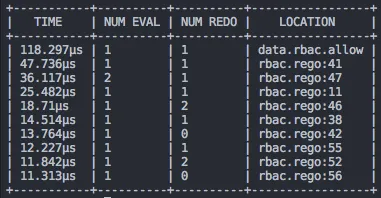
opa eval data.rbac.allow --data rbac.rego --format pretty --profile

By default, when profiling is enabled, OPA will output the top 10 most expensive expressions in the policy.

Example profiler output

Example profiler output.

For more information on the profiler tool, see the new documentation page describing how to test your policies.

Compile API

Finally, as of v0.9, OPA includes new APIs that allow callers to invoke Partial Evaluation via HTTP or in Go with the Rego package.

In the past, decisions returned by OPA were always definitive, e.g., callers would query for an "allow" or "deny" decision and the answer would always be "true" or "false". With partial evaluation exposed, OPA can return condition answers, e.g., "allow" is "true" if certain conditions are satisfied.

Later this week we will publish a blog post that describes how you can enforce data filtering policies in your storage layer with OPA by leveraging the new Compile API.

Managing OPA

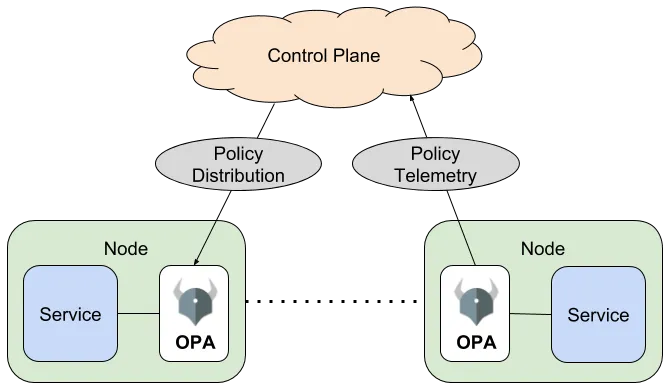
OPA is described as "a general-purpose policy engine that let's you offload decisions from your service," requiring access to policy and data for decision-making.

Before version 0.8, OPA "only exposed low-level HTTP APIs that let you push policy and data into the engine." Version 0.8 adds new management capabilities for distributing policies/data and monitoring agent health.

Architecture diagram showing Control Plane connected via Policy Distribution and Policy Telemetry to two Nodes, each containing a Service and an OPA instance

Bundle API

OPA can now be configured to download "bundles" — described as "gzipped tarballs containing Rego and JSON files" — from remote HTTP endpoints on a periodic basis.

GET /bundles/example/authz HTTP/1.1

Services should respond with a gzipped tarball. If an ETag header is included, it gets reused in subsequent If-None-Match requests, allowing servers to reply with an HTTP 301 Not Modified instead of resending the same bundle.

More info: http://www.openpolicyagent.org/docs/bundles.html

Status API

Since OPA already supports Prometheus-based metrics reporting (http://www.openpolicyagent.org/docs/monitoring-diagnostics.html#prometheus), the new Status API answers two additional questions: which policy/data version is active, and what errors occurred during load.

OPA can be configured to periodically POST status updates to a remote endpoint:

POST /status HTTP/1.1
Content-Type: application/json
{
"labels": {
"app": "my-example-app",
"id": "1780d507-aea2-45cc-ae50-fa153c8e4a5a"
},
"bundle": {
"name": "http/example/authz",
"active_revision": "660daf152602bd95ea2d2139d215678b0ed[...]",
"last_successful_download": "2018-04-17T12:34:40.258Z",
"last_successful_activation": "2018-04-17T12:34:42.196Z"
}
}

The payload also includes labels that "uniquely identify the agent."

More info: http://www.openpolicyagent.org/docs/status.html

Decision Log API

For auditing and debugging, OPA can buffer and periodically upload batches of policy decisions to a remote endpoint. Each event includes:

  • The name of the policy decision requested by your service.
  • The input provided in the query by your service.
  • The result returned by OPA to your service.

Events also include metadata such as bundle revision and agent labels.

More info: http://www.openpolicyagent.org/docs/decision_logs.html

Wrap Up

The author frames these features as simplifying large-scale OPA management while enabling more advanced tooling. Feedback is welcomed via Slack: http://slack.openpolicyagent.org